

What optimized actually means on LinkedIn
Optimization on LinkedIn is not design. It is retrieval. Almost every recruiter conversation starts inside LinkedIn Recruiter or the standard search bar, where the recruiter types a job title, adds a location filter, sometimes a language or a skill, and reads the first two pages of results. Your profile is competing to be retrieved by that query and then to be understood in about ten seconds.

Every recommendation below serves one of those four. If a tactic does not improve retrieval, relevance, credibility or reachability, it is decoration and you can skip it.
- Retrieval
- Whether your profile appears at all for a recruiter query. Driven by keywords in your headline, About, experience titles, skills and location.
- Relevance
- How well the visible preview — photo, name, headline, location — matches what the recruiter is looking for. Decides whether they click.
- Credibility
- What the profile proves once opened: specific achievements, real dates, named organisations, recommendations.
- Reachability
- Whether the recruiter can act — Open to work signals, a contact email, an accepting connection setting, a working portfolio link.
The 100-point profile scorecard
This is the weighting our placements team applies when we review a candidate profile before sending it to a host company. It is deliberately biased towards the fields that LinkedIn search reads, not the fields that look impressive.
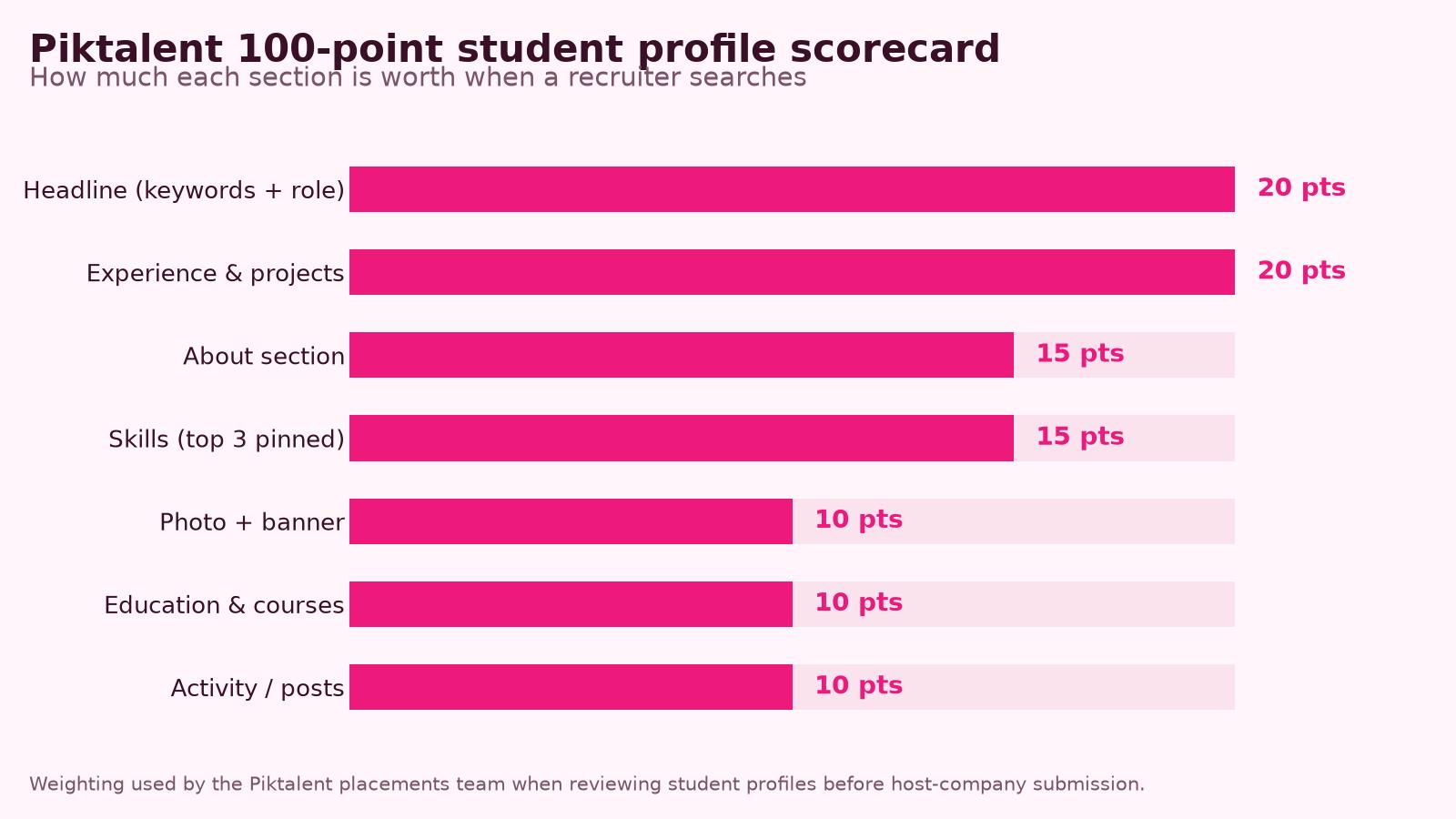
Below 50, your profile is effectively invisible to search. Between 50 and 75, you will appear but rarely rank on the first page. Above 80, you are competing on the substance of your experience rather than on the state of your profile — which is exactly where you want the fight to be.
| Section | Points | Full marks means |
|---|---|---|
| Headline | 20 | Target role or field + specialism + availability, in the vocabulary of real adverts. Not just Student at X University. |
| Experience & projects | 20 | At least three entries with organisation, dates, and achievement bullets containing numbers or scale. |
| About | 15 | 3–5 short paragraphs, answering who you are, what you can do, what you are looking for and how to reach you. |
| Skills | 15 | Up to 50 skills listed, top 3 pinned and matching the target role, with at least 5 endorsements on those three. |
| Photo + banner | 10 | Clear face photo, plain background, plus a banner that is not the default grey. |
| Education & certifications | 10 | Degree, dates, relevant coursework, language levels, plus any completed courses or certificates. |
| Activity | 10 | Any comment or post in the last 30 days, and a profile that is public. |
Step 1 — The twenty-minute foundation: photo, banner and URL
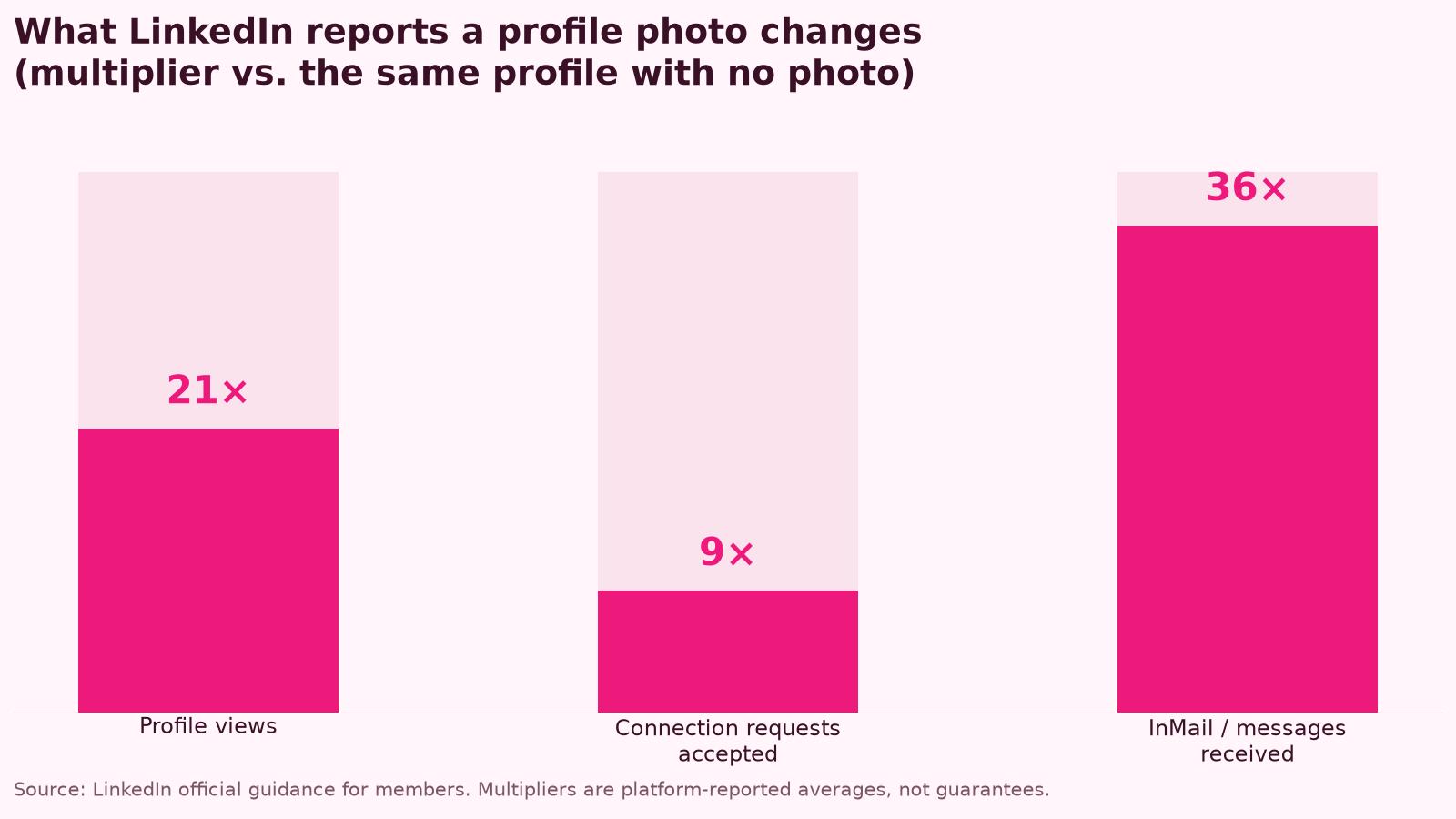
These four fixes take one sitting and they are the cheapest credibility you will ever buy. LinkedIn itself publishes what a photo changes.
- 1Photo
Head and shoulders, face filling roughly 60% of the frame, eyes level with the camera, plain wall, daylight from the front, neutral clothing. A phone on a timer beats a bad studio shot. No group photos, no sunglasses, no graduation gown unless you graduated this year.
- 2Banner
Replace the default grey. Use your city skyline, your campus, your lab or workshop, or a simple branded strip with your field and target role. A 1584 × 396 px image keeps text away from the crop on mobile.
- 3Custom URL
Edit the public profile URL to linkedin.com/in/firstname-lastname. Put it on your CV, your email signature and your portfolio. It is also what search engines and AI assistants index.
- 4Public visibility
In Settings, set Public profile to visible and allow search engines to show it. A private profile cannot be found by Google, by AI answer engines, or by recruiters outside your network.
Step 2 — The headline: the highest-leverage 220 characters you own
Your headline follows you across the whole platform: search results, comments, connection requests, messages, group posts. It is also weighted heavily in search. Most students write Student at University of X, which matches only a query no recruiter ever runs.
- Formula 1 (targeting an internship): Target role + field + availability. Example — Marketing Intern (SEO & Content) | Erasmus+ traineeship available from September 2026 | EN/ES.
- Formula 2 (technical fields): Role + stack + degree. Example — Junior Front-End Developer | React, TypeScript, Figma | BSc Computer Science, TU Delft.
- Formula 3 (career-changers and graduates): What you do + who you do it for + proof. Example — Data Analyst | Turning survey data into decisions for NGOs | Python, SQL, Power BI.
- Include the language pair if you are applying across borders. EN/FR or DE/EN is a filter recruiters use constantly for European placements.
- Include the city you want to work in, not only the city you study in, if you are willing to relocate.
Write the headline last if you must, but never leave it as the default. Copy three adverts for the role you want, list the words that appear in all three, and make sure at least two of them are in your headline.
| Before | After | Why it ranks |
|---|---|---|
| Student at Universidad de Sevilla | Marketing Intern | Social Media & Content | Available Sept 2026 | ES/EN | Adds the role title recruiters search, a specialism, availability and languages. |
| Passionate about technology | Junior Data Analyst | Python, SQL, Tableau | MSc Data Science 2026 | Replaces an unsearchable adjective with three indexed skill terms. |
| Looking for opportunities | Hospitality Management Intern | F&B operations | Erasmus+ funded, Lisbon or Porto | Names the field, the sub-field, the funding route and the destination. |
| Engineering student | Football fan | Mechanical Engineering Intern | CAD, SolidWorks, manufacturing | Erasmus+ 2026/27 | Keeps personality out of the indexed field and moves it to About. |
Step 3 — The About section: a 5-line template that works
Only the first two lines of the About section are visible before the See more fold on mobile. Treat those two lines as the hook and the rest as the evidence. Write in the first person, in plain language, and end with a clear way to contact you.
- 1Line 1 — Position statement
Who you are and what you are training to do. Example: I am a final-year marketing student specialising in content and SEO for B2B brands.
- 2Line 2 — Proof
The single most credible thing you have done, with a number. Example: Last year I grew a student society account from 400 to 2,100 followers in five months.
- 3Paragraph 3 — Capability list
Three to five things you can actually do, using the exact tool and method names an employer would search: Google Analytics 4, Meta Business Suite, WordPress, Canva, basic HTML.
- 4Paragraph 4 — What you are looking for
Role type, duration, start date, location and funding route. Example: I am looking for a six-month Erasmus+ funded marketing traineeship in Spain or Portugal starting September 2026.
- 5Line 5 — Call to action
How to reach you. A working email address here is worth more than any design flourish, because recruiters outside your network cannot always message you.
Step 4 — Experience when you have no experience
The experience section is indexed by job title and read first by humans. Students who leave it empty lose 20 of the 100 points and most of their retrieval. You almost certainly have entries you are not counting.
- Part-time and seasonal work — retail, hospitality, call centres, tutoring, delivery. Write the scale: customers served per shift, cash handled, languages used, team size.
- University projects and coursework — a capstone project, a marketing plan for a real client, a lab investigation, a moot court. Title it as a project role, name the deliverable, name the tools.
- Society, club and class-representative roles — treasurer, events officer, team captain. These are budget, logistics and people-management experience with a different label.
- Volunteering — NGOs, festivals, sports clubs, school mentoring. Add the hours and the outcome, not just the cause.
- Freelance and self-initiated work — a small design commission, a website for a family business, a monetised hobby account. List yourself as freelance with real dates.
- Competitions and hackathons — the brief, your role, the result, the technology used.
The formula is the same as on a CV: action verb, what you did, the tool or method, and a measurable result or a scale figure. If you cannot find an impact number, use a scale number — people, hours, budget, frequency, volume.
| Duty (weak) | Achievement (strong) |
|---|---|
| Worked in a café | Served 120+ customers per shift in a three-person team; trained two new staff on the till and opening procedure. |
| Managed the society Instagram | Grew the society Instagram from 400 to 2,100 followers in five months by publishing three reels a week; average event attendance rose from 25 to 60. |
| Did a university project on renewable energy | Modelled a 12 kW rooftop solar installation in PVsyst for a real client brief; the payback estimate was adopted in the client feasibility report. |
| Volunteered at a festival | Coordinated a 14-person volunteer shift rota across three stages over a four-day festival serving 8,000 visitors. |
Step 5 — Skills, endorsements and the vocabulary that gets you found
Skills are a structured field, which means recruiters filter on them directly. LinkedIn lets you list up to 50 and pin three at the top of your profile. This is where keyword strategy pays off most reliably.
- Pin the three skills that appear in the adverts you are targeting, not the three you are proudest of.
- Mix hard tools (Python, SQL, Adobe Illustrator, SolidWorks, Google Analytics 4) with methods (A/B testing, user research, quality control) and languages.
- Use the exact spelling employers use. Social media management and community management are different strings to a filter, and so are Excel and Microsoft Excel.
- Check the European ESCO classification for your target occupation and reuse its skill terms — most European employers and public job portals are built on that vocabulary.
- Attach skills to specific experiences and to your education entry so they show provenance, not just a list.
- Ask five classmates or colleagues to endorse your three pinned skills. Endorsements are weak signals individually but they order the list.
Step 6 — Education, languages and how to list Erasmus+ mobility
European employers read the education block more carefully than US employers do, and mobility is one of the few things that genuinely differentiates one graduate profile from another. Do not hide an exchange or a traineeship inside a sentence in About.
- Add the degree with exact start and end dates, the full institution name in its local language and in English, and a short list of relevant modules.
- Add the exchange or traineeship as its own entry: host organisation, city, country, dates, and one line on the project you worked on.
- Name the programme explicitly — Erasmus+ traineeship (KA131), Erasmus+ study mobility, or a J-1 internship in the USA. Recruiters and alumni search these terms.
- List languages with the CEFR level (B2, C1) rather than vague words like fluent or intermediate. CEFR is a filterable, comparable standard across Europe.
- Add certificates that carry weight in your field — Google Analytics, HubSpot, AWS, Cambridge or DELE language certificates, first aid, food safety, driving licence categories where relevant.
- Link your Europass profile or portfolio in the Featured section so the evidence is one click away.
If your mobility has not happened yet but is confirmed, add it with a future start date and the word confirmed in the description. Employers plan hiring windows months ahead and an upcoming placement in their city is a reason to contact you now.
Step 7 — Featured, recommendations and proof you cannot fake
Two under-used sections do most of the credibility work once a recruiter has opened your profile.
- Featured — pin three items maximum: a portfolio, a project write-up, a published article, a certificate, or a short video. Check every link opens on mobile; a broken portfolio link is worse than none.
- Recommendations — two are enough. Ask a supervisor from a part-time job, a project tutor, or your internship mentor. Give them three bullet points to work from so writing it takes them five minutes.
- Ask for the recommendation at the moment the work ends, not months later. The reply rate difference is enormous.
- Return the favour immediately — reciprocity is the main reason recommendation requests get accepted.
“A recruiter can verify one thing in thirty seconds: whether the profile matches the CV. Mismatched dates and job titles are the single most common reason we send a candidate back before submitting them to a host company.”
Step 8 — Activity: a realistic cadence for a busy student
You do not need to be a content creator. You need to not be invisible. A profile with zero activity in six months reads as abandoned, and LinkedIn surfaces active profiles more often in feeds and suggestions.
- Write about what you did, not about what you think in general. A 150-word note on how you fixed a bug or ran an event outperforms a motivational quote every time.
- Comment where your target employers already are: company pages, industry associations, alumni groups.
- Follow the host companies and destination cities you are targeting so their posts give you natural, relevant things to comment on.
Consistency compounds. Four weeks of this cadence is usually enough to start receiving profile views from recruiters rather than only from classmates.
| Week | Action | Time |
|---|---|---|
| 1 | Comment substantively on two posts from people in your target field. Add a fact or a question, never just Great post. | 10 min |
| 2 | Publish one short post: something you learned in a project or a module, in five sentences, with one takeaway. | 15 min |
| 3 | Send five personalised connection requests with a two-line note. Alumni of your university at target companies first. | 15 min |
| 4 | Update one section of your profile with something new — a certificate, a project, a skill — and comment twice more. | 20 min |
Step 9 — Settings that decide whether recruiters can actually reach you
Optimizing the content and leaving the settings wrong is the most common self-inflicted wound we see. Check all of these once.
- Open to work — set it to recruiters only if you do not want your current employer to see it, and fill in the role titles, locations and start date. Those fields feed recruiter search directly.
- Location — set it to the city where you want to work if you are willing to relocate, and mention your current city in About. Recruiters filter by location before anything else.
- Public profile — on, and visible to search engines. This is what makes your profile findable through Google and readable by AI assistants when someone searches your name.
- Contact info — add an email address you actually check. Recruiters without InMail credits cannot message you otherwise.
- Profile language — add a secondary profile in the language of your destination country. A Spanish or German version doubles the queries you match.
- Name pronunciation and pronouns — optional, but both are quick trust signals in international hiring.
Step 10 — Using LinkedIn to actually find a placement
An optimized profile is a landing page. It only pays off if you send traffic to it. These are the mechanics that work for students with no professional network.
Twenty well-targeted conversations beat two hundred cold applications. That is the whole argument for putting effort into the profile in the first place.
- 1Mine the alumni tool
On your university page, open Alumni, filter by city and by field. These are the highest-response-rate contacts available to any student, because the shared institution gives the message a reason to exist.
- 2Send a two-line connection note
Say who you are, name the shared context, and ask one specific question. Example: I am a final-year marketing student at Sevilla heading to Lisbon on an Erasmus+ traineeship in September. You made the same move in 2022 — would you mind telling me which agencies take interns?
- 3Follow up once, after a week
One short follow-up doubles reply rates. A second one does not. Move on gracefully.
- 4Set job alerts with the right filters
Use Internship and Entry level experience filters, add the destination city, and save the search. Apply within 48 hours of a posting going live — application volume peaks in week one.
- 5Research before every interview
Read the profiles of the people interviewing you. Their career paths tell you what the team values, and referencing a real project of theirs is the cheapest differentiator in the room.
Step 11 — LinkedIn Learning: turning courses into search-visible skills
LinkedIn Learning is the only part of the platform that changes what your profile says about you rather than how it is written. Finishing a course adds a certificate, and — this is the part most students miss — it lets you attach the associated skills to your profile, which is exactly the field recruiters filter on. Used deliberately, it is the fastest legitimate way to close the gap between the skills an advert asks for and the skills your profile can claim.
- It is usually free for students: most European universities license LinkedIn Learning through the library or careers service, and many public libraries do the same. Check before paying for the one-month trial — sign in through your institution so the certificates stay available after the trial period would have ended.
- The value is the skill tag, not the badge. When you mark a course complete, LinkedIn offers to add its skills to your profile. Accept only the ones you can defend in an interview, and let those feed your skills list.
- Certificates land in Licenses & certifications with an issuer, a date and a credential URL. That section is indexed, so the course name itself becomes searchable text on your profile.
- Courses also unlock skill assessments for tools such as Excel, Python and Adobe. Passing one adds a verified badge; failing one is private, so there is no downside to attempting it.
- Completion data is visible to recruiters using LinkedIn Recruiter. For a student with little work history, a coherent set of four or five courses in one discipline reads as evidence of direction.
Treat LinkedIn Learning as skill acquisition with a side effect of profile keywords, never the other way round. Three finished paths plus three small artefacts will move you further in a recruiter search than any rewrite of your headline can — and unlike experience, you can complete them before the next application deadline.
| Target field | Learning paths worth the hours | Skills to add and pin |
|---|---|---|
| Marketing & communications | Digital marketing specialist; SEO foundations; content strategy | SEO, Google Analytics 4, content marketing, copywriting, Meta Ads |
| IT & software | Junior developer paths (Python, JavaScript); Git essentials; SQL | Python, Git, SQL, REST APIs, unit testing |
| Data & analytics | Data analyst path; Excel advanced; Power BI or Tableau | Data analysis, SQL, Power BI, data visualisation, Excel |
| Business & finance | Financial analysis foundations; Excel for finance; project management | Financial modelling, Excel, budgeting, Agile, stakeholder management |
| Hospitality & tourism | Customer experience; revenue management basics; hospitality operations | Customer service, revenue management, front-office operations, upselling |
| Design & UX | UX foundations; Figma essentials; design systems | UX research, Figma, wireframing, prototyping, accessibility |
- 1Start from the keyword list, not the catalogue
Go back to the advert-mining exercise in Step 2. Take the three tools or methods that appeared most often and that you cannot currently claim — Google Analytics 4, SQL, Figma, HubSpot, SEO fundamentals — and search LinkedIn Learning for those exact terms.
- 2Prefer learning paths over single videos
Paths bundle 8–15 hours of courses around one role (Become a Digital Marketing Specialist, Become a Junior Data Analyst). They generate a richer skill set and a single, coherent line on your profile.
- 3Take notes as future achievement bullets
While you work through a course, build one small artefact — a dashboard, a landing page, a cleaned dataset, an audit of a real website. The certificate proves attendance; the artefact proves capability and belongs in Featured.
- 4Add the skills, then pin them
On completion, accept the skill tags that match your target role, then pin the three most relevant at the top of your skills list. This is the step that changes whether you appear in recruiter searches.
- 5File the certificate properly
Add it under Licenses & certifications with LinkedIn as the issuer, the completion date, and the credential URL. Leave the expiry field empty — these do not expire.
- 6Reference it once in About or the experience entry
One clause is enough: "completed the Google Analytics 4 essentials path and rebuilt the reporting for our student society's events." Never let a certificate stand alone without an application of it.
Common mistakes we see on student profiles
- The headline still says Student at University of X — invisible to every role-based search.
- The profile is in English but the target market is Germany, Italy or Spain, with no secondary-language profile.
- Experience dates do not match the CV. Recruiters check, and mismatches read as carelessness at best.
- A summary written in the third person, or copied from a template with the placeholders still in it.
- Skills listed as generic virtues — hardworking, motivated, team player — which no recruiter has ever used as a search filter.
- A Featured link to a portfolio that 404s or requires a login.
- Contact details buried, no email, and messaging restricted so nobody outside the network can write.
- Six months of total silence, then twelve profile updates in one evening.
- Dozens of LinkedIn Learning certificates in unrelated subjects, with none of their skills added to the skills section — visible effort, zero search benefit.
Every one of these is a twenty-minute fix. None of them require new experience — only a decision about who the profile is written for.
Your 30-day optimization plan
Do it in four sittings. Each block is deliberately small enough to finish in one evening.
Re-score against the 100-point rubric on day 30. Anything below 80 tells you exactly which block to repeat.
| Days | Focus | Deliverable |
|---|---|---|
| 1–3 | Foundation | Photo, banner, custom URL, public visibility, contact email, location set to target city. |
| 4–10 | Keywords | Advert mining exercise, rewritten headline, 50 skills listed with three pinned, ESCO terms checked. |
| 11–18 | Substance | About rewritten to the five-line template, three experience entries with achievement bullets, education and mobility added with CEFR language levels. |
| 19–24 | Proof | Featured section with three working links, two recommendation requests sent, certificates uploaded. |
| 25–30 | Visibility | Open to work configured, four comments, one post, ten alumni connection requests, two job alerts saved. |
| Ongoing | Skills | One LinkedIn Learning path per month in your target discipline, with its skills added and one artefact pinned in Featured. |
Tools and official resources worth using
Short and curated. Each of these solves one specific problem in the process, and all but one are free.
Two free checks cost nothing: view your own profile in an incognito window, and ask one person in your target field to read your headline and tell you what job they think you want. If their answer is not the job you want, the headline is wrong.
- LinkedIn Help — profile best practices
The platform's own guidance on completing each profile section. Worth reading once because the field definitions tell you what is indexed.
- LinkedIn Learning — courses and learning paths
Free through most European universities and many public libraries. Use it to close the specific tool gaps in your target adverts, then add the resulting skills to your profile.
- ESCO — European skills and occupations classification
Look up your target occupation and copy the official skill terms European employers and public job portals are built around.
- Europass — profile and CV tools
Free European Commission tools for storing certificates and describing language levels in CEFR, which you can mirror on LinkedIn.
- EURES — living and working conditions in Europe
Country-by-country hiring norms — useful when deciding how formal your profile language should be for a specific market.
- Canva — banner and portfolio templates
Fast way to produce a 1584 × 396 px LinkedIn banner and a simple one-page portfolio to pin in Featured.
- Piktalent internship programmes
When the profile is ready, this is where it goes to work: vetted host companies across Europe and the USA, with profile and CV review included in our placement service.
Final pre-application checklist
- The headline names the role you want, not your student status.
- The first two lines of About say what you can do and prove it with one number.
- At least three experience entries, each with achievement bullets and a scale or impact figure.
- Three pinned skills that match the adverts you are applying to, each with endorsements.
- Mobility, exchange or traineeship listed explicitly with host, city and dates.
- Languages listed with CEFR levels.
- Photo, banner, custom URL, public profile and a working contact email.
- Every Featured link opens on a phone.
- Dates and job titles match your CV exactly.
- At least one comment or post in the last 30 days.
An optimized profile does not get you hired. It gets you found, and then it gets you a conversation — which is all any application document has ever been able to do.
Continue reading on Piktalent
Frequently asked questions
Continue exploring
Pages on the Piktalent site that go deeper on the topics covered above.
Internship fields mentioned here
Related guides and resources
- How to write a good CVYour LinkedIn profile and CV must tell the same story — start here.
- Internship programmes for studentsWhere the optimized profile goes to work.
- How to find an Erasmus internship placementThe search strategy your profile supports.
- How to apply for an Erasmus+ internship in 2026The full application sequence, step by step.
- Premium placement servicesOne-to-one profile and CV review with our placements team.
References
Official sources cited in this article. All links open in a new tab.
- LinkedIn Learning — courses, learning paths and skills — LinkedIn
- LinkedIn Help — profile completeness and best practices — LinkedIn
- ESCO — European Skills, Competences and Occupations classification — European Commission
- Europass — describe your skills and qualifications — European Commission
- Common European Framework of Reference for Languages (CEFR) — Council of Europe
- EURES — living and working conditions in Europe — European Commission / EURES
- Erasmus+ Programme Guide — traineeships and mobility for learners — European Commission
- Employment rates of recent graduates — Eurostat
About the authors
Piktalent Editorial — Erasmus+ mobility practitioners since 2009
This guide is written by the Piktalent editorial and placements team. Piktalent is the mobility brand of The Student Mobility Group, which has organised international internships and Erasmus+ traineeships since 2009. We place students with host companies across Europe and the USA, sign the learning agreements, vet the hosts and support participants on the ground — so the procedures described here are the ones we run ourselves, not a summary of other websites.
Why we can write about this
- •Operating since 2009 as The Student Mobility Group; Piktalent since 2023.
- •Erasmus+ KA131, KA171, KA121 and KA122 mobilities handled end to end for sending institutions.
- •Host-company vetting, learning agreements, accommodation, insurance and in-country support in 30+ countries.
- •Direct daily contact with national agencies, host employers, universities and VET providers.
How this article is verified
- •Every factual claim is checked against a primary source — EU institutions, national agencies, ministries or official statistics — before publication.
- •Figures, fees and deadlines are re-checked at the verification date shown at the top of the article.
- •Procedures are cross-checked against the cases our placements team handled in the last 12 months.
- •Corrections are welcome: write to us and we update the guide with the date changed.
Institutional sources we work from
The official references behind our careers, skills and mobility guidance. Each opens on the issuing institution's own domain.
- ESCOEuropean skills & occupations classification
- EuropassOfficial CV and skills profile tools
- CEFRCouncil of Europe language levels (A1–C2)
- EURESLiving and working conditions across Europe
- EurostatEmployment statistics for recent graduates
- Erasmus+ Programme GuideRules, eligibility and funding for every key action
Need help running a real Erasmus+ mobility?
We deliver host search, contracts, accommodation and 24/7 support end-to-end.